
Overview
Broccoli is the AI all-in-one lead management solution home service businesses trust around the clock, helping the trades run smarter, grow faster, and get more done.
The integration with Sera Systems allows for direct scheduling to our dynamic scheduler, as well as handling the addition of new customers, cancellations, and reschedules, all using real technician availability.
Click HERE to book a demo with Broccoli and see the Sera integration in action!
How This Works
Calls come in, Broccoli agent answers:
-
Broccoli is fully configurable based on each client’s workflows and Sera requirements. Broccoli provides a recommended set of questions and best practices as a starting point, so clients don’t need to design the experience from scratch. From there, clients can customize what information Broccoli collects and when it collects it, including different questions or qualification criteria based on the job type or nature of the call.
-
Broccoli also uses the caller’s phone number to identify existing customers automatically. If the caller cannot be identified immediately, Broccoli uses the service address to identify the caller.
The goal is to collect the information needed for an accurate booking without unnecessarily interrogating the caller or creating friction in the conversation.
How does Broccoli determine if it’s a current customer of Sera?
-
Broccoli begins identifying the customer the moment the call comes in.
-
The first lookup is performed using the incoming phone number against the customer data available in Sera, including primary and additional phone numbers. This happens essentially instantaneously, so Broccoli knows who the caller is before the conversation begins.
-
If there is not a definitive match from the phone number alone, Broccoli can intelligently use additional information collected during the conversation, such as the caller’s first and last name, email address, or service address, to resolve the customer identity.
-
This is not dependent on forcing the caller through a rigid sequence of identity questions. Broccoli gathers information naturally as part of the conversation and booking workflow, then uses the available data to make the most accurate match possible.
-
-
If Broccoli cannot confidently identify an existing customer at the beginning of the call, it simply continues the conversation normally rather than disrupting the customer experience. As additional information is collected (for example, the service address during booking) Broccoli gains more data points it can use for matching.
-
At the completion of the call, Broccoli uses all of the information available to determine whether the caller corresponds to an existing Sera customer.
-
If a reliable match exists, Broccoli associates the interaction and booking with that customer.
-
If no appropriate match can be made, Broccoli creates a new customer record in the CRM.
-
-
This approach allows Broccoli to maximize match accuracy while minimizing unnecessary questions and friction for the caller.
If Broccoli finds the customer in Sera, they can cancel / reschedule existing appointments and they can also book new appointments.
Broccoli can can also create a new service address in Sera, and book an appointment for that service address.
If Broccoli cannot find the customer in Sera, they can create a new customer, add the proper service address, and can book a new appointment for the customer.
Broccoli is using Technician availability in Sera to communicate if / when available appointments are, and customers can edit priorities in Broccoli directly.
Enabling the Integration
Sera uses the Marketplace to initiate and manage integrations with the click of a button.
-
Go to Company > Marketplace and locate the Broccoli marketplace card.
- By clicking Learn More, you can submit a demo request via a Sera referral link to see a demo of the Broccoli product and how the integration works.
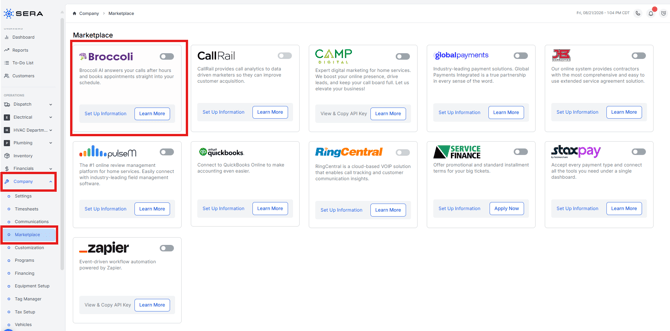
- By clicking Learn More, you can submit a demo request via a Sera referral link to see a demo of the Broccoli product and how the integration works.
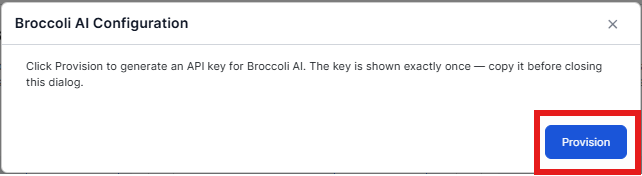
- To initiate the integration, select Set Up Information, and Provision.
- By selecting provision, you will receive a unique API key which you can provide to your Broccoli CSM during onboarding. They'll be able to use that unique key to initiate the integration.