
What Issue Does This Solve
The following pain points were consistent across Clients:
- Invoices stayed "open" after a refund. A partial refund posted as a negative payment, which pushed the invoice balance back up instead of resolving it — the invoice looked unpaid.
- Technician revenue & commissions were overstated. Refunded work still counted at full value, so commission runs, dashboards, and revenue reports all inflated.
- Customer signature was wiped when an admin edited the quote to zero it out after a refund.
- QuickBooks saw the wrong document. Refunds landed as a Journal Entry against A/R rather than a QBO‑native Refund Receipt or Credit Memo, so QBO's own refund reports and customer statements were incomplete.
What's New
In Sera: partial refund reconciliation, which includes:
- Invoice balance resolves to $0 when the refund brings the customer whole. No more "hanging" open balance from a negative payment.
- Revenue & commissions net the refund. Technician revenue, the commission report, and all dashboards that read revenue now use the net figure. If the same technician is paid a commission on a job that later gets a partial refund, the commission calculation reflects it.
- Refund tax is proportional. When a taxable job is partially refunded, the refund is split between revenue and sales tax on the taxable base, matching what an accountant would expect.
- Signature protection. Editing a signed quote to zero the balance no longer clears the customer's signature. Money‑changing edits on a signed quote are blocked.
- New Refund Modal copy nudges the admin toward the reconciliation flow and tracks completion in Pendo.
In Quickbooks Online — refund sync strategy, which includes:
- Default: Refund Receipt. Partial refunds sync to QBO as a single Refund Receipt against the originating invoice. This is what QBO's own refund flow produces and is what most tenants want.
- Opt‑in: Credit Memo + Refund Check. Tenants who want the full accounting trail can switch to this strategy in the Marketplace > QuickBooks setup panel. It produces (a) a CreditMemo linked to the invoice for audit purposes, and (b) a Check drawn from a configurable bank account for the cash outflow.
- Refund Check Bank Account setting. The Credit Memo strategy needs to know which bank account to draw refund checks from. A new field on the QBO Marketplace card captures this. The setting is only required when the Credit Memo strategy is selected.
- In‑flight refund safety. Any refund that was already partially synced when this shipped continues under the legacy Journal Entry path. Strategy switches only affect new refunds.
For Admin: Turning on the Credit Memo Strategy

Setup Checklist:
- In QuickBooks: turn off "Automatically Apply Credits" (Advanced → Automation).
- In Sera Marketplace > QuickBooks: pick the Refund Check Bank Account.
- In Sera Marketplace > QuickBooks: change the Refund sync strategy dropdown to Credit Memo + Refund Receipt.
- Issue a small test refund and confirm the Credit Memo + Check pair appears in QBO tied to the original invoice
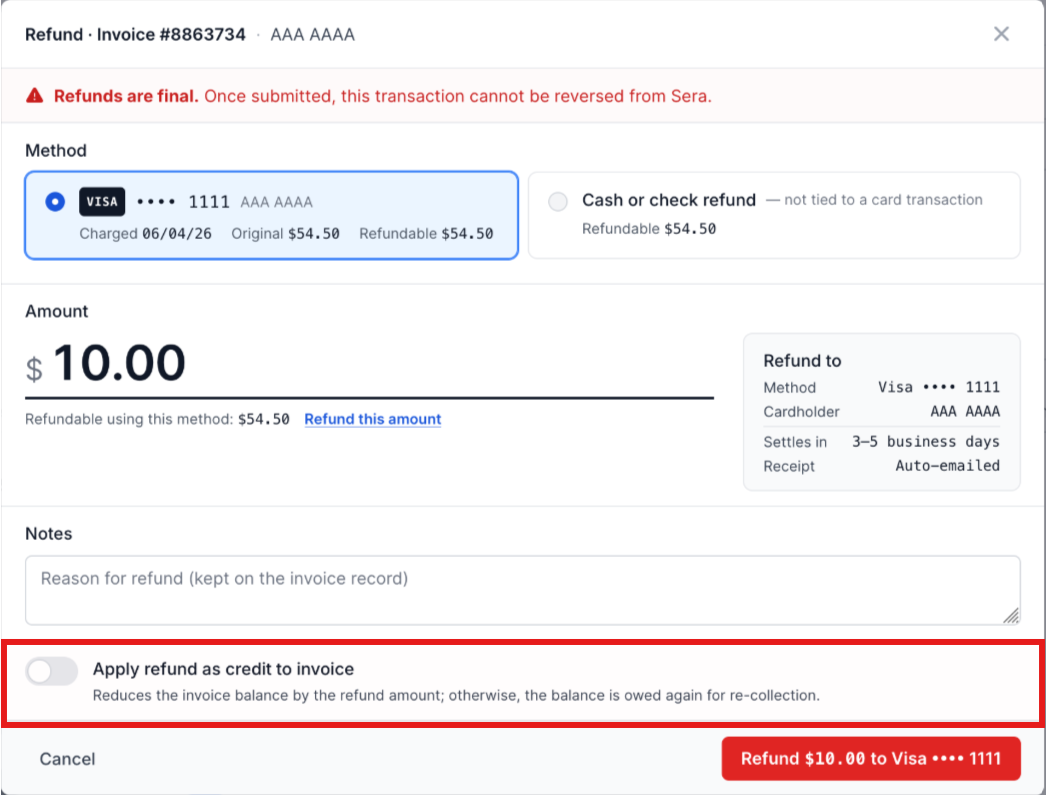
Note: As the Client, on a per-refund basis, you have the ability to "apply refund as credit to invoice" - or not - and choose not to toggle this option on assumes the balance is still owed again for re-collection. See the image below for the additional toggle.
Known Behavior: Paid-Invoice Audit Link
For refunds against invoices that are already fully paid in QuickBooks (the common case), the Credit Memo is created but is not stapled to the invoice via QBO's LinkedTxn. QBO rejects that link because the invoice has no open balance to absorb the credit. The Refund Check still debits A/R and clears the credit balance, so the accounting nets correctly — but the QBO invoice → Credit Memo link is only present when the invoice carried a residual balance at refund time (partial pay, split payment, etc.).