
What's New & Improved
This release includes a few workflow enhancements around memberships and failed membership payments.
- Auto-Retry for Failed Membership Payment(s): When a membership renewal payment fails, Sera's retry engine quietly works in the background to recover it — retrying automatically over the following 72 hours.
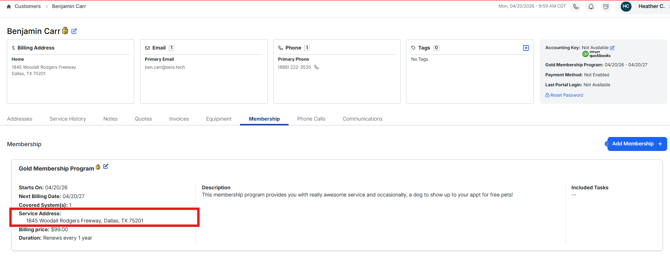
- Memberships are automatically tagged to the Service Address when Sold on a Quote / Invoice: When a Technician using Sera Mobile or an Admin in the Admin Portal sells a membership, the Service Address selected within the quote and invoice is automatically associated to the membership program within the Customer Profile. This removes any additional steps to identify the address and ensure they are properly associated.
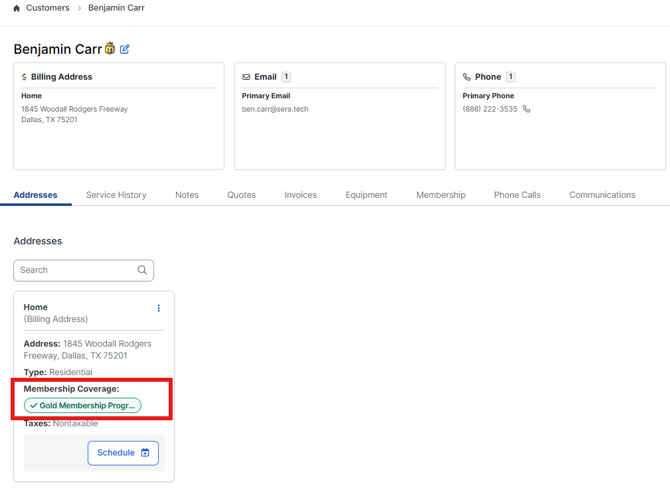
- From the Customer Profile in the Admin Portal, you can now see which Service Addresses have a Membership Associated: When reviewing the Customer Profile in the Admin Portal, and navigating to Addresses, you can now easily see which Service Addresses have a Membership applied and which ones do not.
- Membership Quote Pricing Automatic: When building a quote, customers with a membership will have that membership pricing selected on the quote automatically without any additional intervention. This is true for both 1-column and 2-column quoting; the primary difference is that on 1-column column, there is no "you could have saved" at the bottom of the quote.