
Scheduler Update: Control Customer Notifications for Schedule Changes
Overview
We’ve added a confirmation step when appointment schedule changes are made in the scheduler. Admins can now choose whether to notify the customer when an appointment’s time slot is updated.
What’s New
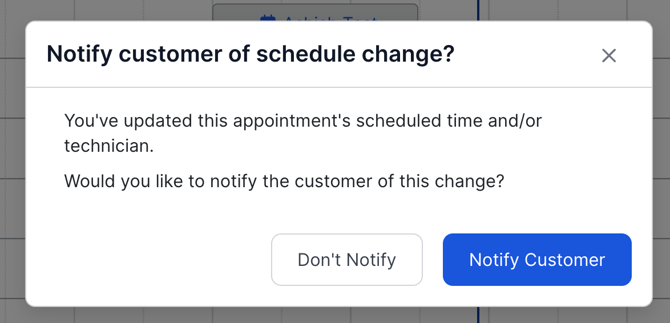
When an appointment’s schedule is changed, Sera will now display a confirmation modal asking whether the customer should be notified.
This appears when schedule changes are made from:
-
Drag-and-drop rescheduling on the schedule board
-
Editing the scheduled time inside the appointment drawer
How It Works
After a scheduling change is made, the update is immediately reflected on the schedule board. A confirmation modal will then appear asking whether the customer should be notified.
Admins can choose one of the following options:
Notify Customer
-
Sends the standard appointment reschedule notification
-
Saves the updated appointment details
Don’t Notify
-
Saves the updated appointment details
-
No notification is sent to the customer
If the modal is closed without making a selection, the system will default to Don’t Notify.
Why This Change Was Made
Recent scheduler improvements automatically triggered customer notifications when appointments were adjusted from the schedule board. This update restores admin control, allowing teams to decide when a customer should be notified about scheduling changes.