
What's New & Improved
- Redesigned Accept Payment Modal
-
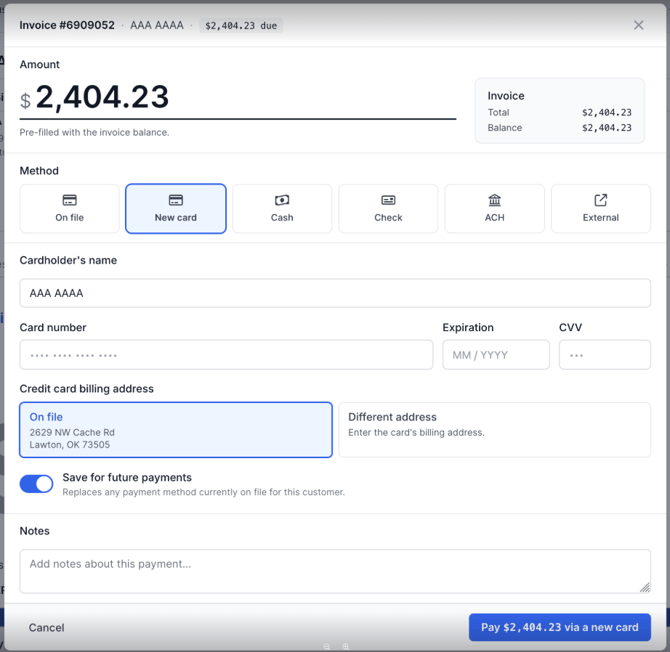
The modal you open from Invoice Actions → Accept Payment has been overhauled to make a payment feel like a single, scannable action instead of a form to fill out.
What changed:
- Header now reads with the Invoice # - Customer Name - Amount Due so the context is unmissable.
- The amount is the visual anchor — large input, pre-filled with the invoice balance, with a quick Use full balance link.
- An INVOICE summary card sits to the right of the amount so the total and balance stay visible while typing.
- Method tiles (On file · New card · Cash · Check · ACH · External) sit below the amount with consistent iconography.
- A sticky bottom action bar follows you down the form. The CTA updates with the selected method (Pay $X.XX via a new card, Pay via Check, etc.).
- If you type an amount over the balance, an inline warning appears immediately.
-
- New Refund Modal
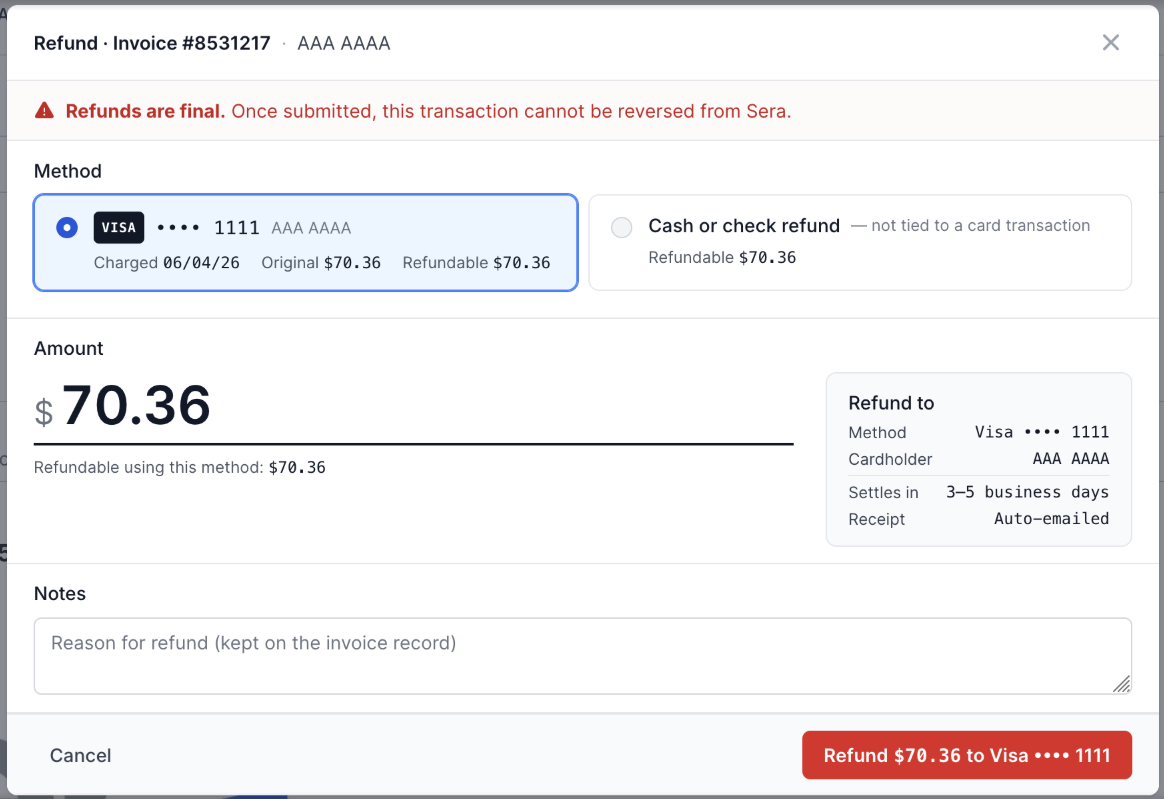
- Refunds have a similar redesigned accessed via Invoice Actions -> Issue Refund.
What changed:
- A prominent red "Refunds are final" warning sits at the top — once submitted, the transaction cannot be reversed from Sera.
- A Source picker shows every original card transaction with charged date, original amount, and how much remains refundable. The user picks which transaction the refund is coming out of.
- A Cash or check refund option is offered for refunds that are not tied to a card transaction.
- The amount field shows Refundable from this source: $X.XX with a Full refund shortcut.
- A REFUND TO summary card on the right shows method, cardholder, settlement window (3–5 business days), and receipt.
- Refund notes are kept on the invoice record for audit.
- Refunds have a similar redesigned accessed via Invoice Actions -> Issue Refund.
- Quick-Linking to Invoice and Job
-
A set of small but meaningful navigation shortcuts has been added so you can jump between related records without backtracking through breadcrumbs or the customer page.
What changed:
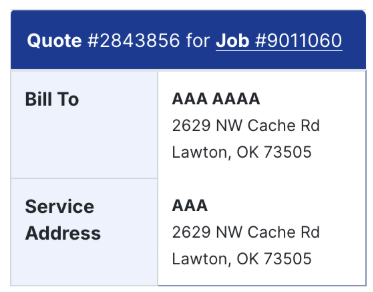
- Job number link in the quote/invoice detail header. When you view a quote or an invoice outside the job context (for example, from the Customer profile or the Revenue report), the job number in the DetailBox header is now a clickable link to the job page.
- Invoice link in accepted-quote breadcrumbs. Once a quote is accepted and becomes an invoice, the breadcrumb on the quote view adds a direct link to the resulting invoice so you can jump from quote → invoice in one click.

- Job number link in the quote/invoice detail header. When you view a quote or an invoice outside the job context (for example, from the Customer profile or the Revenue report), the job number in the DetailBox header is now a clickable link to the job page.
-
- Action Menu Grouping
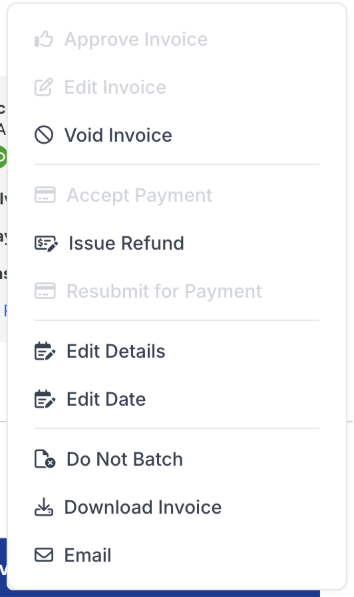
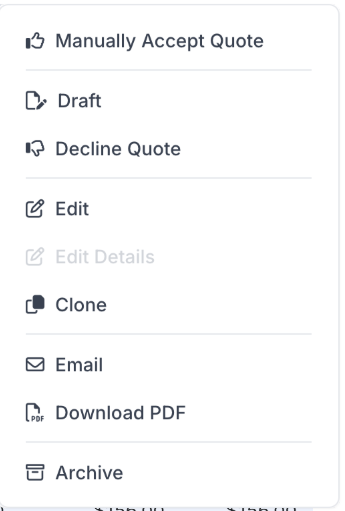
- The Invoice Actions and Quote Actions dropdowns have been reorganized into logical groups, with thin dividers between groups, so common workflows are easier to scan.
What changed:
- Invoice Actions — four groups (in declared order): status (Approve, Accept Payment, Issue Refund), payment (the new Configure / Edit / View / Remove Payment Schedule items), edit (Edit Details, Edit Date), share (Email, Download Invoice, plus Void / Do Not Batch / Resubmit for Payment).
- Quote Actions — five groups, applied consistently to both the Customer profile and the standalone Quote actions menus: accept (Propose, Create an Invoice, Manually Accept Quote, Force Accept, Schedule Work), status (Reactivate, Draft revert, Decline Quote, Unapprove), edit (Edit, Edit Details, Clone), share (Email, Download PDF), lifecycle (Archive, Unarchive). Propose sits at the top of accept because it's the earliest workflow step (draft → pending).
- No empty dividers. Group dividers are driven by an optional
groupfield on each menu item, so a group with no visible items (e.g., because of permissions) does not leave behind an orphan divider line. - Removed the 300ms open delay. Actions menus now open immediately on click instead of after a short pause. This was a debugging item that was inadvertently released in the past, causing a subtle, though perceivable delay in menu opening.
- The Invoice Actions and Quote Actions dropdowns have been reorganized into logical groups, with thin dividers between groups, so common workflows are easier to scan.
- Other User Experience Updates
- Off-Link Click-Handling on the Quote Grid - In the Revenue, Pending Revenue, Quotes, and Customer profile grids, clicking anywhere in a Job or Invoice link cell now navigates to that record — previously you had to hit the anchor text precisely, and the cell padding around it was dead space. A slightly stray click or tap would previously trigger the row click handler, taking you to the quote when you may have intended to reach the action menu, job, or invoice
- Badge Polish - Accounting key, last login, membership, and payment method badges share consistent spacing and icon treatments
- Card brand icons on saved payment methods (Visa, Mastercard, Discover, Amex) render at consistent sizes inside the method tiles.