
What's New & Improved
- Ability to Search by Customer ID: We've added a search and filter option for Customer ID within the Customer Hub.
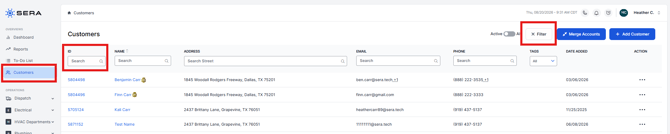
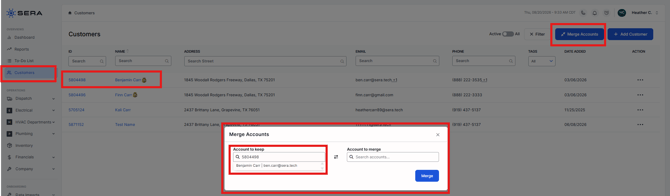
- Ability to Search by Customer ID when Merging Accounts: We've added the ability to search by Customer ID when merging customer accounts, to both the Account to Keep and Account to Merge fields.
- The search does require an exact match; it does not support type-ahead to prevent conflict between search by customer ID and phone number.
- The Customer populated is an exact match when searching in either of these fields.
- Schedule Times Updated to Include AM and PM: We've made a minor adjustment to the scheduler to ensure appointment arrival windows include AM and PM for both times for better clarity.
- Customer and Jobs Tabs Alphabetized: We've made a minor change based on customer feedback to alphabetize customer and job tags.
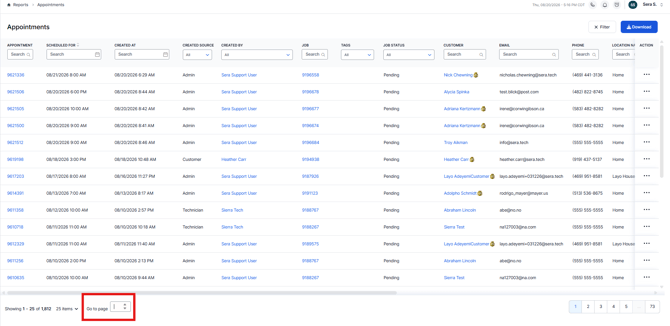
- Ability to "jump to a specific page" within Reports: We have added pagination controls to reports, allowing customers to jump to specific pages, which is incredibly helpful for large reports.
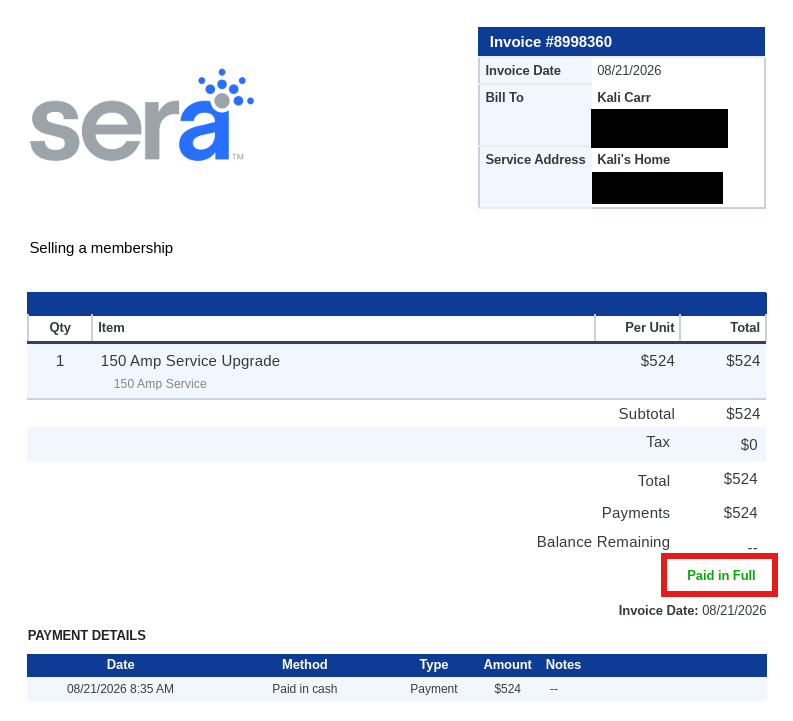
- Invoices with $0 Balance show Paid in Full: A minor update has been made for any invoices that have a $0 balance, to show Paid in Full instead of just the dashes outlining no balance owed. This enhancement was shipped to address some Client requirements based on certain state financing programs.
- Job Times Report Updated: We have added two (2) columns to the Job Times report. Completed Date and Technicians. The Technicians column shows a list of all Technicians for that specific job, not just the Opportunity Owner. There is still an Opportunity Owner column to identify that Technicians for each Job.